
Change Date of Service
An account's date of service (transaction date) can be changed if necessary.
Method 1 - from an open account:
From the Account menu, choose "Change Date of Service"

See "Continue" below for remaining steps.
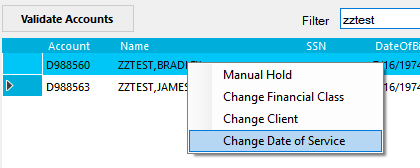
Method 2 - from the worklist:
You can also change the date of service from the worklist screen.
Right-click on a highlighted account, and choose Change Date of Service.
See "Continue" below for remaining steps.
Continue
In the dialog that appears, choose the new date of service and enter a reason for the change.
Click OK to complete the change.
