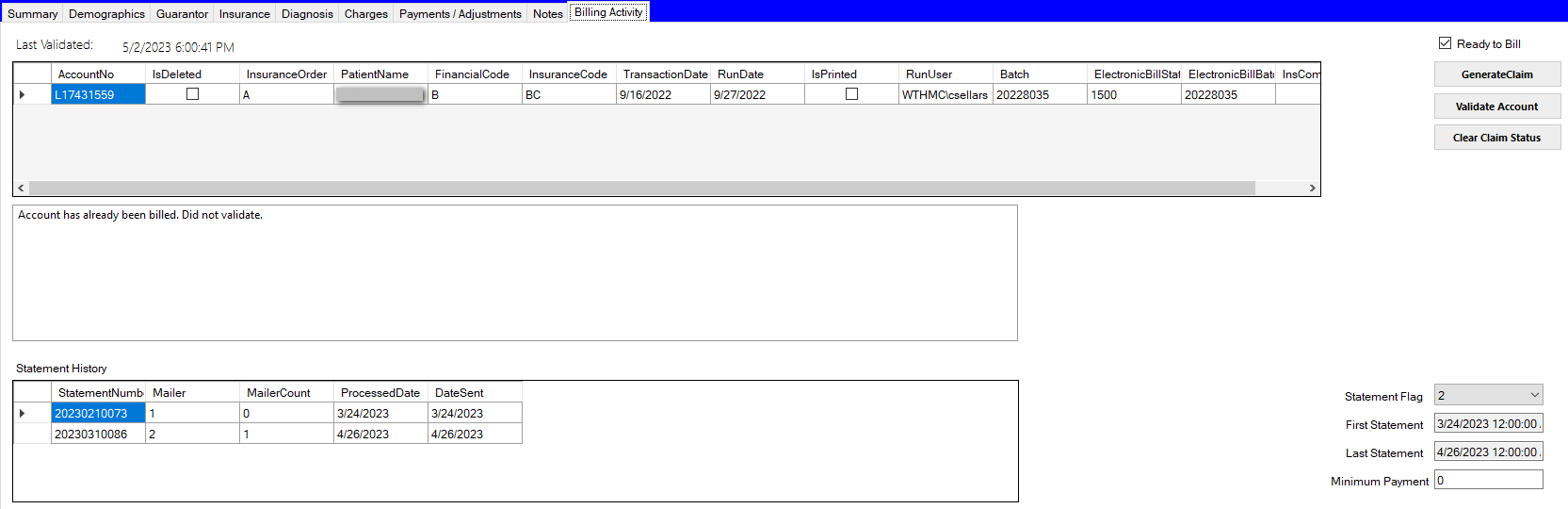
Billing Activity Tab
The Billing Activity Tab is where the account's state in the billing process is managed.
Last Validated shows the date and time the account was last evaluated for billing. The box below the billing activity shows the validation status or any errors if the account does not pass validation. Any errors in the validation status must be resolved before the account can be flagged ready to bill.
After errors have been corrected, click the Validate Account button to revalidate. If the account has no errors, it can be marked Ready to Bill by checking the Ready to Bill checkbox. This will flag the account to be picked up by the claims job to be sent to the billing clearinghouse.
To clear the claim status so it is picked up by the claims job, click the Clear Claim Status. The system will prompt with a warning that clearing the claim status may result in duplicate claim submissions. The user must acknowledge by clicking OK to proceed, or click Cancel to not clear the claim status.
If a balance remains after other payers have been processed, change the Statement Flag to "Y" to flag the patient to receive a statement for the balance. See PatientStatements for further detail on patient collections.
Statement History - This area will show the statements generated for this account